FAQs
What is a Coach-Assigned DUPR?
A Coach-Assigned DUPR is an initial doubles rating given by a certified DUPR Coach for players who do not yet have a rating from logged matches. Instead of being calculated from submitted matches, it is determined through a structured on-court assessment.
During a doubles match, either in person or via uploaded video, the coach evaluates the player across key game areas: Serve, Return, Non-Bounce Volley, Dinking, 3rd Shot Drop, Kitchen Readiness, Shot Selection, Court Positioning, and Partner Chemistry. Based on performance and faults in these areas, the coach assigns a DUPR rating that serves as the player's starting point. Once linked to the player's account, the rating appears in the DUPR app for use in open play, programs, events, and competitive play. The Coach-Assigned DUPR can be updated by a coach until the player logs a match, after which the algorithm takes over.
This is the only rating in the system not generated from match results and provides an accurate launch point for a player's DUPR journey. It applies only to doubles and is not used for singles.
Am I eligible to get Coach-Assigned DUPR?
The Coach-Assigned DUPR is for players who do not yet have a doubles rating and have not logged any matches. If you already have a doubles DUPR rating, a coach's assessment will not affect your current rating, and you are not eligible for a Coach-Assigned DUPR.
Please do not create a second DUPR account to receive a Coach-Assigned DUPR. Doing so may result in the suspension of your account and potentially your coach's account. Instead, focus on logging more matches to provide the algorithm with the data it needs to accurately reflect your skill level.
Why get a Coach-Assigned DUPR?
A Coach-Assigned DUPR gives players a clear understanding of their current level and a starting point as they begin their DUPR journey. It ensures players are placed appropriately in open play, programs, leagues, and events, creating more competitive and enjoyable experiences from day one.
DUPR is the language of the sport for players of all levels, including social, recreational, competitive, and professional. A clear starting rating helps every player find the right playing environment, track progress, and integrate seamlessly into the broader pickleball community. This anchor accelerates a player's DUPR journey by providing a foundation that naturally updates as real match results are logged or can be maintained until a player decides to begin logging official DUPR matches.
How can I receive a Coach-Assigned DUPR?
There are two ways to receive a Coach-Assigned DUPR:
- In-person assessment with a certified DUPR Coach.
- You can work directly with a DUPR Coach who will run a structured on-court evaluation and assign your starting rating. Fees for in-person assessments are set entirely at the discretion of each coach.
- Uploading film through the My DUPR Coach app
- Players may submit match footage through the My DUPR Coach app for a remote assessment. This option requires an annual My DUPR Coach app subscription of $49.99.
A DUPR or My DUPR Coach app subscription is not required to receive a Coach-Assigned DUPR.
How can I switch between the roles?
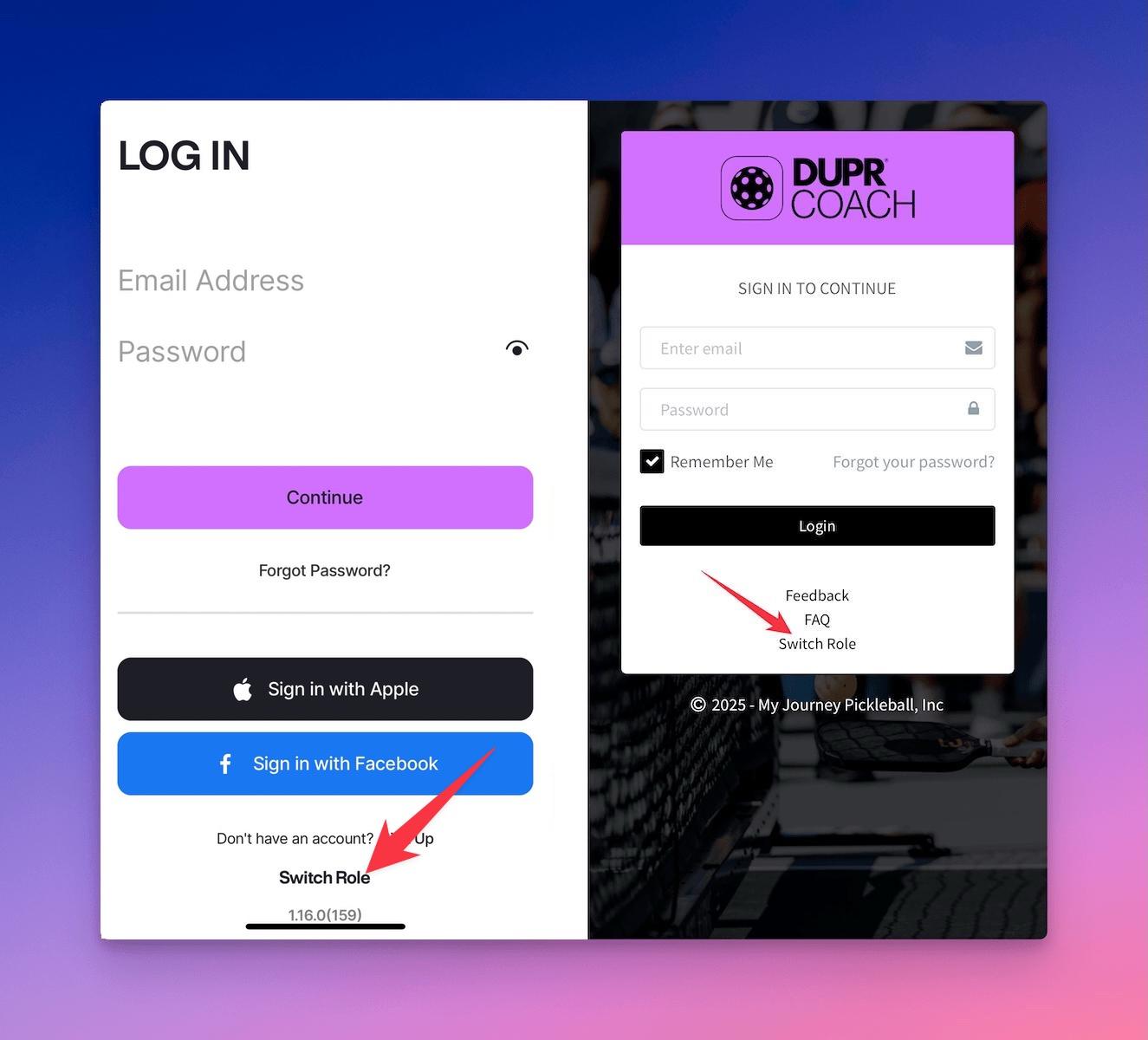
Depending on which role you switched to you can find a Switch Role link on the login screen as shown in screenshot below or inside the app.
How can I prepare for my rating session?
Follow the instructions in the Pre-Rating Session - Player Checklist
How can I change my coach?
Navigate to Menu > Find a Coach, within the My DUPR Coach app, find a coach you would like to be transferred to and tap "Get Your DUPR" link.
You will prompted to approve a transfer and restart the app. Once completed, your new coach will appear in the app.
How can I connect to DUPR?
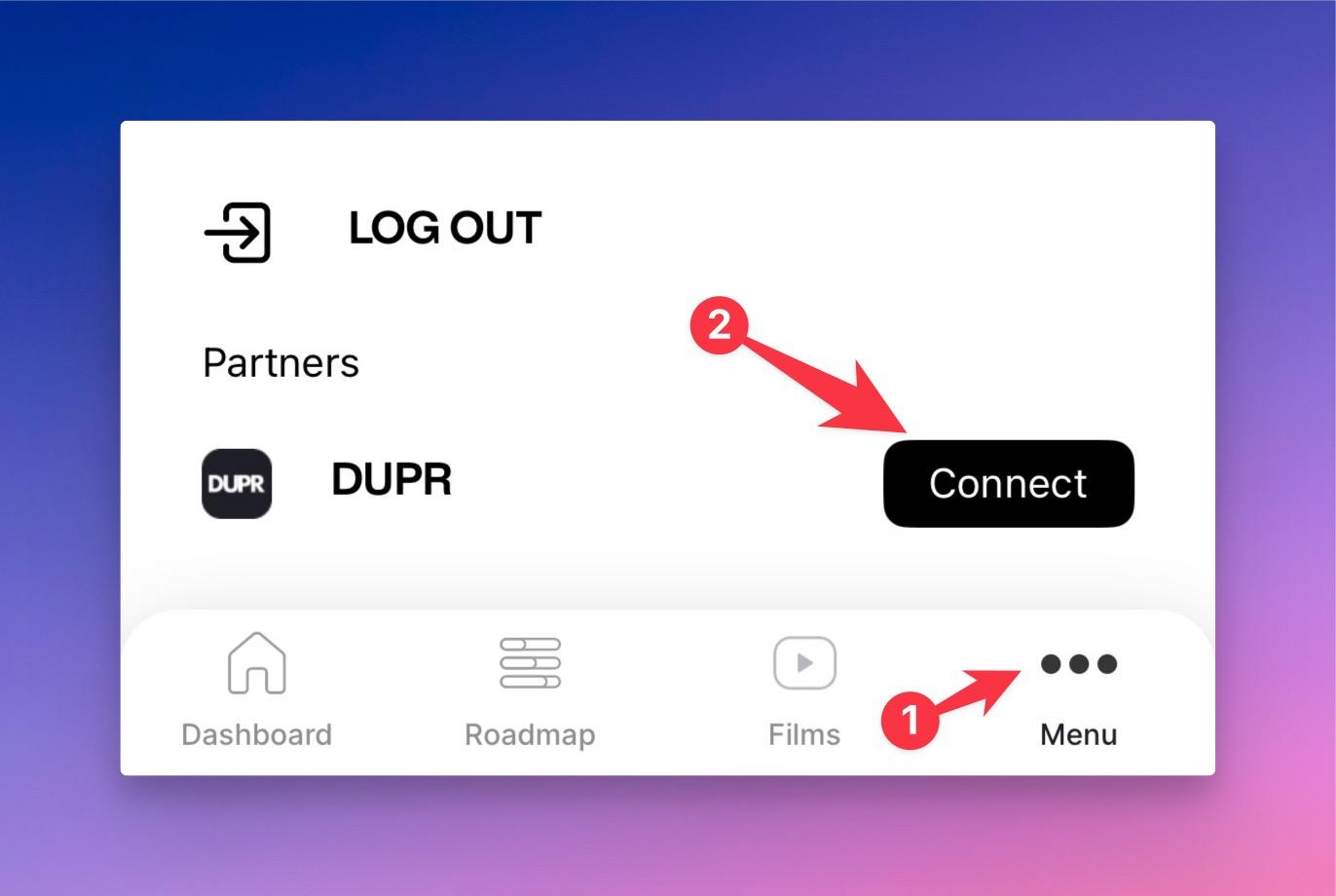
Tap on Menu > Connect within the My DUPR Coach app, as shown in the screenshot below, and follow the on-screen instructions.
What are the filming guidelines for submitting video for a Coach-Assigned DUPR?
Recommendations on how you should record your assessment videos:
- Video Size: 5min or 500MB
- Resolution: 1080p at 60 fps
- Orientation: Landscape
- Placement: Each of the four corners should be visible in the frame and not obstructed by the net at about 5ft off the ground
- Lighting: Avoid filming with direct sun in the background; if it's hard to make out players or the ball, it will be difficult to assess
- Game: The video must be of a doubles pickleball game (no warmups please!)
I don't see my rating in the My DUPR Coach app, what should I do?
If you worked with a DUPR Coach in person and have not yet received your rating, make sure you've completed all the required steps here.
If you submitted video through the My DUPR Coach app, it may take up to 48 hours to receive your rating.
If your rating does not appear after 48 hours, whether you worked with a coach in person or uploaded video, contact your coach by going to Menu > Find a Coach in the app, selecting the coach's name to open their profile, and tapping the “Contact Coach” link to send a message.
What should I do after receiving a Coach-Assigned DUPR?
Review page 7 here for your next steps after receiving your rating. You can either maintain your Coach-Assigned DUPR or start logging matches to update your rating!
Help Me Understanding Pickleball Skill Levels in DUPR?
DUPR range from 2.00 to 8.00, ensuring every player is accurately placed in the right competitive category.
- 2.00 - 2.99: Beginner to early intermediate, developing basic shot consistency.
- 3.00 - 3.99: Intermediate players with improving strategy and shot control.
- 4.00 - 4.99: Advanced players with strong tactical awareness and execution.
- 5.00 - 8.00: Elite and professional-level players competing in high-level tournaments.
- Learn More
How can I manage my subscription
- iOS
- Android
Access subscription management screen by navigating to the Settings > Your Apple ID > Subscriptions.
Learn More
Access subscription management screen by navigating to the Google Play > Menu > Payment & Subscriptions.
Learn More
What version of iOS/Android are supported?
- iOS: 12.0 or later
- Android: 8.0 or later
How can I contact the support?
You can reach our support via an email at support@duprcoach.com